The Project
Post-event follow-up is one of those workflows that looks simple from the outside and turns out to be surprisingly hard to do well. After a conference or networking event, a typical SMB sales or marketing professional comes home with business card photos, voice memos, LinkedIn screenshots, and handwritten notes. The goal is obvious: sort through these materials, figure out who actually matters, and follow up before the momentum fades. The reality is a slow, manual process of data entry, half-remembered context, and judgment calls made on too little information.
The tools that exist around this problem have not helped much. CRM card scanners read the name but mangle the company. Generic AI assistants require the user to paste in each contact one at a time. Nothing holds the full context of an event: who this person is, why they matter, what the right next action is.
PostEvents is my attempt to solve this properly: from a folder of raw event materials to a scored, CRM-ready contact list in one command.
PostEventsis an AI agent skill. The user drops their materials into a folder, opens an AI coding assistant, and says "process my event contacts." The agent runs a six-stage pipeline, pausing at two points for human review, and produces a scored contact list with a recommended next action per lead.
- Target users: Sales and marketing professionals at SMBs. Enterprise teams typically have established CRM workflows and dedicated ops processes. The gap this fills is most acute for smaller teams without that infrastructure.
- Format: An open-source AI agent skill, published on GitHub. Works with Claude Code, Cursor, Codex, and any MCP-compatible coding assistant.
Pipeline Overview
1. Ingest
Raw materials → structured contacts
Extract structured contact data from every file in the inputs folder.
2. Organize + Review
Normalize → human checkpoint
Normalize data and open an interactive browser dashboard for user verification.
3. ICP Input
User context → scoring rubric
Learn the user's Ideal Customer Profile through a short conversation.
4. Enrich
Gaps → selective web context
Selectively fill in gaps via web search for contacts that need more context.
5. Classify + Score + Action
Relationship → fit tier → next move
Assign relationship type, ICP fit tier, and a specific next-action recommendation.
6. Results + Export + Handoff
Dashboard → CSV → drafting handoff
Produce a results dashboard, summary report, CRM-ready CSV, and a handoff file for follow-up message drafting.
Why a Skill, Not a Product
This is the design decision that came first, and it reflects something broader happening in the tooling world.
Mar-tech (marketing technology) is a category that has always grown by accumulating features. Need contact scoring? There is a product for that. Need card scanning? Another product. Need enrichment? Another one. The result is a fragmented stack of subscriptions, each holding a slice of data, none connected without integrations that require ongoing maintenance.
AI agents are starting to dissolve that model. What used to require a specialized product (extracting structured data from unstructured materials, applying a scoring rubric, running web enrichment) an agent can now do natively given the right workflow and knowledge base. The infrastructure exists. What has been missing is the design layer on top of it.
A "skill" is a structured, reusable workflow that an AI agent can execute. It is not an app with a login page, not a SaaS subscription. It lives inside tools users are already working in, runs locally, keeps data on the user's machine, and produces exactly what the user needs without requiring a new interface to learn.
For this problem, the skill format made practical sense: the workflow is well-defined, the inputs are varied, and the user needs to stay in control at key decision points. A standalone product would have added complexity that the problem does not require.
The Design Challenge: Human Checkpoints in an Autonomous Pipeline
Once the pipeline architecture was clear, the harder design question emerged: where does the human stay in the loop, and how?
Autonomous agents have a trust problem. When a system runs a multi-stage process end-to-end, the user has no visibility into intermediate decisions. If something goes wrong, like a name misread from a business card or a company wrongly classified, they find out at the end, when fixing it means reprocessing from scratch. That is fine for low-stakes tasks. Contact scoring, where a wrong classification could mean ignoring a priority lead, is not low-stakes.
The standard answer is "human in the loop," but that phrase is underspecified. Pausing at every stage would eliminate the efficiency gain the agent was supposed to provide. The real design question is: which decisions genuinely benefit from human judgment, and where can the agent proceed without interruption?
PostEvents pauses twice.
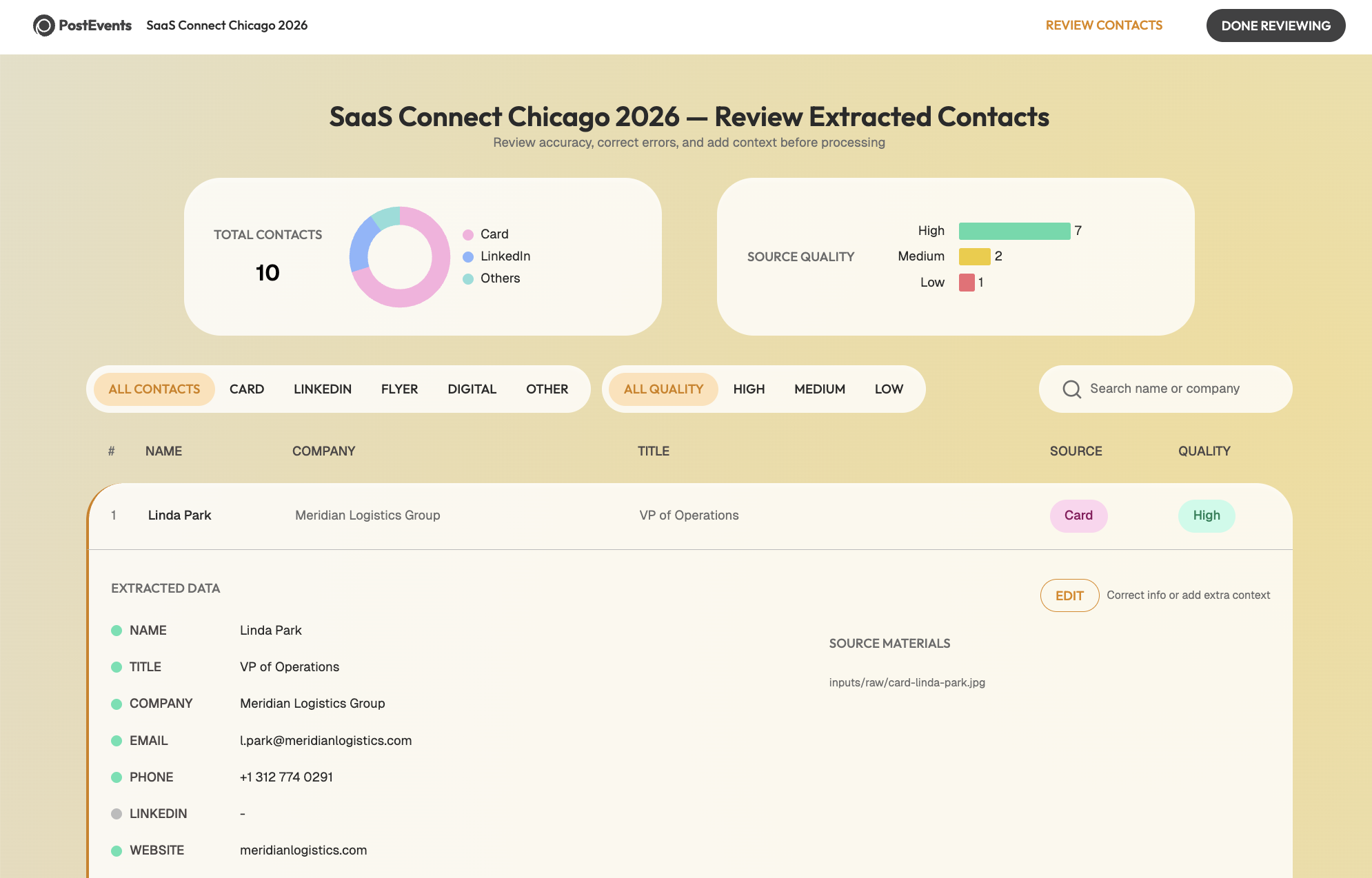
- After Stage 2: An interactive browser dashboard opens showing every extracted contact alongside the original source image. The user can verify names, correct titles, add context, and flag gaps. When they click "Done Reviewing," the pipeline resumes.Extracted Contacts: An interactive dashboard for verifying data accuracy before enrichment.
- After Stage 6: A results dashboard shows the full classification output (tier, relationship type, recommended action) before any exports are used.Follow-up Results: A prioritized view of leads with suggested next actions and ICP scoring.
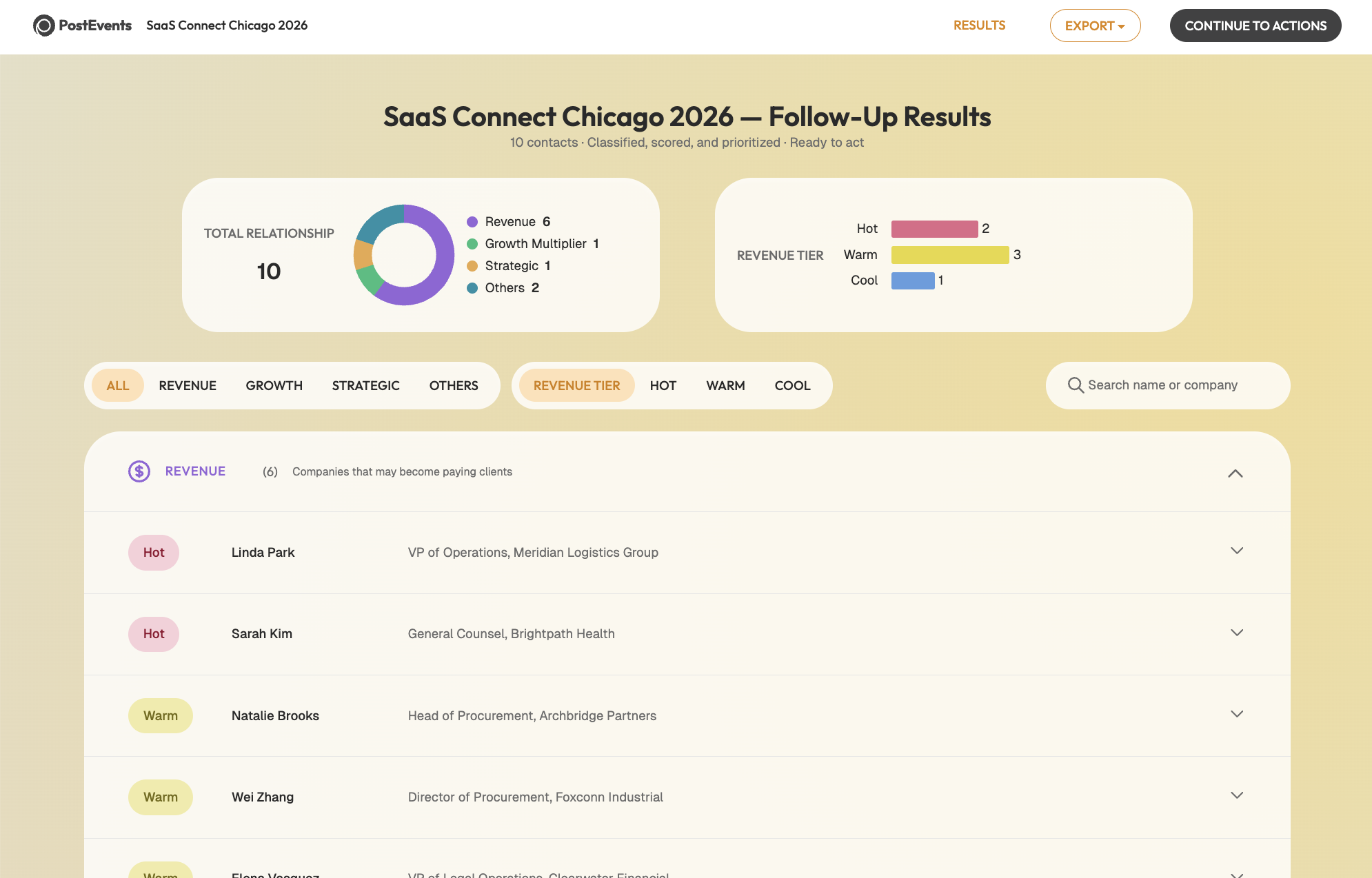
Strategic Pivot:The first checkpoint catches data accuracy issues. The second lets the user validate the agent's reasoning. Between them, the pipeline handles mechanical steps autonomously, collecting ICP information conversationally, keeping human interruptions to the moments where they genuinely change the outcome.
The Template Decision: Stability as a Feature
There was a smaller design problem that took longer to notice.
AI agents produce HTML output dynamically. That means the layout of a generated dashboard can vary between runs: columns shift, spacing differs, visual hierarchy changes. For a results view that a user needs to scan quickly and confidently, that inconsistency adds friction in a subtle but real way. The user has to re-orient to the layout before evaluating the content.
The fix was to lock the templates. Both dashboards are pre-built HTML files with a fixed structure. The agent's job is to populate them with data, not design them. Every run produces a dashboard that looks exactly the same.
Design Logic:When an AI is producing something a human needs to review and trust, consistency in presentation is not a cosmetic preference. It is how the user builds a reliable mental model of what they are looking at. The agent's reasoning should be adaptive. Its output format should be stable.
Other UX Considerations
A few smaller choices shaped the overall experience.
- Grouping interactions by actor: Scattering human-input steps throughout creates a fragmented experience. Grouping all human inputs together before the agent runs its classification work made the flow feel more like a clean handoff: you do your part, then the agent does its part.
- Designing for interruption: Multi-minute pipelines are vulnerable to life getting in the way. PostEvents tracks session state in a JSON file and uses output file presence as the authoritative source of truth for where to resume. If the pipeline is interrupted, the agent picks up from the last completed stage.
- Graceful degradation: Not every user has audio transcription configured or MCP tools connected. Each capability is optional: the pipeline produces meaningful output without web enrichment, without audio transcription, without MCP. Their presence improves quality. Their absence does not break anything.
Takeaways
A few things became clearer after building this.
The current wave of AI tooling is mostly focused on what agents can do. Less attention goes to how users relate to what agents do: how they verify it, trust it, correct it, build a reliable mental model of what the system is up to. That is a design problem, and one that will only become more consequential as agents take on higher-stakes work.
The locked template decision was a small example of this. The two-checkpoint structure was a larger one. Neither required sophisticated engineering. Both required thinking carefully about where the user's judgment is irreplaceable and where the agent's autonomy is actually an asset.
The other thing that became clear is about translation. Domain knowledge about a workflow, understanding its edge cases, its judgment calls, its common failure modes, is genuinely useful when building the system that automates it. The scoring rubric in PostEvents reflects accumulated thinking about what makes a conference contact worth following up with. The enrichment rules reflect experience with when web search adds signal and when it just adds noise. That kind of knowledge does not come from reading a spec. It comes from having done the manual version.